
Imagine a potential patient a few blocks from your clinic. They pull out their phone and search “best physiotherapist near me” or “dentist open on Saturday.” In that moment, on that tiny screen, a battle is being fought for their attention. Will your clinic appear in the top 3 of the Google Map Pack, or will it be buried on the second page, essentially invisible?
For most modern healthcare practices, your Google Business Profile (GBP) is your digital front door. It’s often the very first interaction a potential patient has with your brand. An incomplete or unoptimized profile doesn’t just look unprofessional; it actively costs you patients who are searching for your exact services.
But here’s the good news: Google Business Profile is a free and incredibly powerful tool. You just need to know how to use it. This comprehensive checklist is designed specifically for busy healthcare professionals like you. Follow these steps, and you’ll transform your profile from a simple listing into a patient-attraction machine.
Why Your Google Business Profile is Your Clinic’s Most Important Digital Asset
Think of your GBP as more than just a map listing. It’s a dynamic snapshot of your practice that provides patients with everything they need to make a decision: your location, hours, services, photos of your facility, and most importantly, reviews from other patients.
In today’s digital-first world, a strong online presence is non-negotiable for healthcare local SEO. When patients search for care, they’re looking for trust and convenience. A well-managed GBP provides both, answering their questions before they even have to click through to your website. It’s the foundation of any successful Google Maps optimization strategy for doctors.
The Complete GBP Checklist for Healthcare Practices
Ready to turn searchers into scheduled appointments? Let’s dive into the step-by-step checklist.
Section 1: Nailing the Basics (The Foundation)
Get these core elements right, and you’ll be ahead of 50% of your competition.
- Claim or Create Your Profile: The first step is to gain control. Go to google.com/business to either create a new profile or claim an existing one that Google may have auto-generated for your clinic.
- Use Your Exact Clinic Name: This sounds simple, but it’s crucial. Your GBP name should match the name on your clinic’s front door and your website exactly. Avoid adding keywords like “Best Dentist in Town” – this violates Google’s guidelines and can get your profile suspended.
- Select the PERFECT Primary Category: This is arguably the most important setting on your profile. Be as specific as possible. Don’t choose “Medical Clinic” if you can choose “Dermatologist,” “Pediatrician,” or “Physical Therapy Clinic.” This tells Google precisely what you do.
- Add All Relevant Secondary Categories: Do you offer other specialized services? A dental clinic might have “Cosmetic Dentist” and “Orthodontist” as secondary categories. A physiotherapy clinic might add “Sports Medicine Clinic.” Add every category that applies.
- Verify Your Address and Pin Location: Double-check that your address is typed correctly and that the pin on the map is dropped directly on your clinic’s entrance. An incorrect pin can send frustrated patients to the wrong building.
- Set Accurate Hours of Operation: Ensure your hours are always up to date. Don’t forget to set special hours for holidays or upcoming closures. Nothing frustrates a potential patient more than showing up to a closed clinic when Google said it was open.
Section 2: Adding Detail & Building Trust
Once the foundation is set, it’s time to add the rich details that convert searchers into patients.
- Add Your Primary Phone Number: Use a direct line to your reception desk to make it as easy as possible for patients to call.
- Link to Your Website: Add your website’s homepage URL. Make sure it’s the secure version (
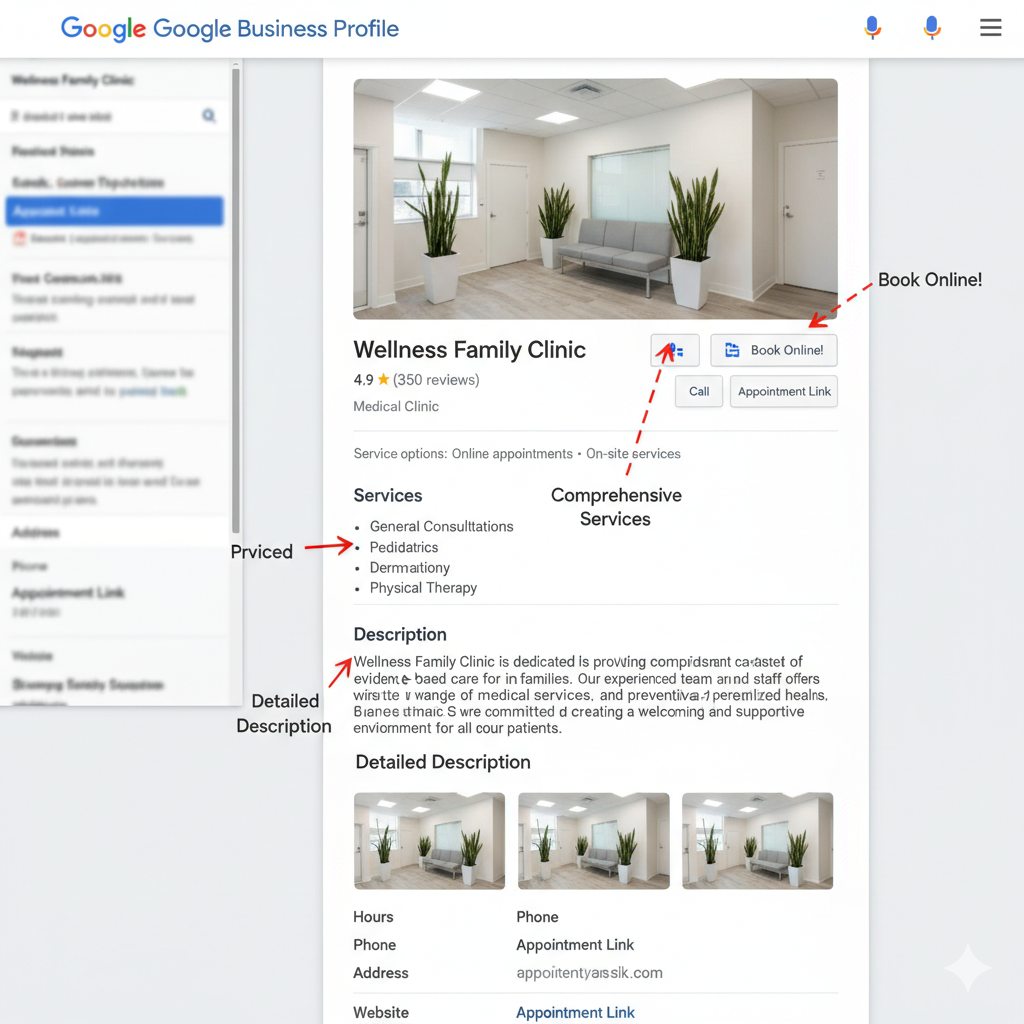
https://). - Add Your Appointment Link: This is a game-changer for clinics. Add a direct link to the booking page on your website. This removes friction and makes it incredibly simple for a user to schedule an appointment right from your profile.
- Detail ALL Your Services: This section is a goldmine for
healthcare local SEO. Don’t just list a few things. If you’re a dental clinic, don’t just put “General Dentistry.” List “Teeth Whitening,” “Dental Implants,” “Root Canal Therapy,” and “Invisalign,” each with a brief description and price (if applicable). When someone searches for those specific terms, Google is more likely to show your profile. - Write a Compelling Business Description: You have 750 characters to tell your story. Don’t just list services again. Talk about your clinic’s philosophy, your approach to patient care, and what makes you unique. Use patient-focused language and naturally include keywords about your practice and location.
Section 3: Visuals – Show, Don’t Just Tell
Would you trust a clinic with no photos of its facility or team? Neither would your patients. Photos build immediate trust and give a feel for your practice.
- Upload a High-Resolution Logo & Cover Photo: Your logo helps with brand recognition, and the cover photo should be a high-quality shot that best represents your clinic (e.g., your welcoming reception area or the front of your building).
- Add High-Quality Interior & Exterior Photos: Show off your space! Upload clear, bright photos of your waiting room, treatment rooms, and the exterior of your building so patients know what to look for. A clean, modern, and welcoming environment is a huge selling point.
- Post Professional Team Photos: Healthcare is human. Putting a friendly face to the names of your doctors, nurses, and staff makes your practice feel more approachable and trustworthy.
- Consider a Short Clinic Tour Video: A simple 30-60 second video walkthrough of your clinic can have a massive impact, helping to ease the anxiety some patients feel about visiting a new medical facility.
Section 4: Engaging with Patients (The Active Part)
This is the section where consistent effort separates the top-performing clinics from the rest.
- Regularly Publish Google Posts: Think of Google Posts as free mini-adverts that show up directly on your profile. Share health tips, introduce a new piece of technology at your clinic, announce a “meet the doctor” event, or introduce a new staff member. Aim for at least one post per week to show Google and patients that your profile is active.
- Master Your Reviews: Reviews are the lifeblood of your clinic’s online reputation.
- Respond to ALL reviews: Thank positive reviewers by name. For negative reviews, respond professionally and empathetically, taking the conversation offline. A thoughtful response to a bad review can often win more trust than a dozen 5-star reviews.
- Actively seek out reviews: The key is to
get more patient reviewsethically. A simple follow-up email after an appointment with a direct link to your GBP review section can work wonders.
- Proactively Manage the Q&A Section: Anyone can ask a question on your profile, and anyone can answer it. Don’t leave it to chance.
- Pro-Tip: Seed your own Q&A section. Ask and answer the most common questions you get at the front desk. “Is parking available?” “What insurance plans do you accept?” “Are you accepting new patients?” This provides immediate value and lets you control the narrative.
- Turn On the Messaging Feature: This allows patients to send you a direct message from your profile. Be prepared to respond quickly (within a few hours) to these inquiries. You can set up an automated welcome message to manage expectations.
Feeling Overwhelmed? You’re Not Alone.
As you can see, a fully optimized google business profile for clinics is much more than a simple listing. It’s an ongoing marketing channel that requires strategy, consistency, and time—three things that are in short supply when you’re busy running a healthcare practice.
Optimizing your profile isn’t a “set it and forget it” task. To truly dominate the local map pack, you need to be consistently publishing posts, generating new reviews, responding to feedback, and updating your information. It’s a job in itself. You’re an expert in providing patient care, not in navigating the ever-changing algorithms of Google.
Turn Your Google Profile into a Patient Magnet with Rehabitize
If you’re looking at this checklist and wondering how you’ll ever find the time to implement it all, we can help.
Rehabitize’s Google Maps Optimization service is designed specifically for healthcare professionals like you. We handle every single item on this checklist and more. We’ll transform your Google Business Profile into a powerful tool that consistently attracts new, high-quality patients, letting you focus on what you do best: providing excellent care.
Pingback: Rise of Healthcare Subscriptions: Your Go-To Guide